Using Chat Mode
Chat mode lets you interact with the LLM in a simple, single-turn format. You can use it two ways: with a knowledge base for retrieval-augmented generation (RAG), or without one for a direct conversation with the model.
Try It: Direct Chat (No Knowledge Base)
Follow these steps to chat directly with the LLM without retrieval:
-
In the sidebar, set Mode to Chat.
-
Make sure no knowledge base is selected — leave the Knowledge Base dropdown unset.
-
Type a question in the input box and press Enter. For example:
"What is retrieval-augmented generation?" -
Expected result — the model responds using only its built-in training data. The answer will be general-purpose and will not reference any uploaded documents. No source citations appear because there is no retrieval step.
Try It: Chat With a Knowledge Base (RAG)
Follow these steps to chat with RAG retrieval:
-
In the sidebar, set Mode to Chat.
-
Select a knowledge base from the Knowledge Base dropdown (e.g., one of the pre-loaded FantaCo collections).
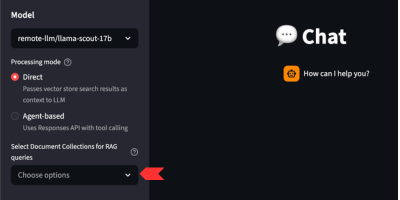
-
Type a question that relates to the documents in that collection and press Enter. For example:
"What is the vacation policy for full-time employees?" -
Expected result — the model returns an answer grounded in the retrieved document chunks. Source citations appear alongside the response so you can trace the answer back to the originating document. The response should closely mirror the language in the source documents.
|
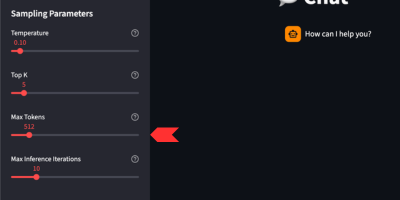
Since the knowledge base is retrieved, you may need to increase Max Tokens in the sidebar. Retrieved chunks consume a significant portion of the token budget, and a low cap can cause the response to be cut short. |
How RAG Retrieval Works
When a knowledge base is selected the system augments every query with relevant document context:
-
Your question is converted into a vector embedding using the loaded embedding model.
-
The top-k most relevant document chunks are retrieved from PGVector based on semantic similarity.
-
Those chunks are inserted into the LLM prompt as context.
-
The LLM (e.g.,
Llama-3.2-3B-Instruct) generates a response grounded in the retrieved context. -
Responses include source references so you can trace the answer back to the originating document.
When to Use Each Approach
| Direct Chat (No KB) | Chat With Knowledge Base |
|---|---|
General-purpose questions that don’t need proprietary context |
Questions about specific documents you’ve uploaded |
Testing the model’s baseline capabilities before layering in RAG |
Policy, procedure, or reference lookups |
Creative or open-ended prompts |
Any question where you need grounded, citable answers |
Tuning the Response
Use the sidebar sampling controls to influence output:
| Parameter | Effect |
|---|---|
Temperature |
Higher values (e.g., 0.9) increase creativity; lower values (e.g., 0.1) make responses more deterministic. |
Top-p |
Controls nucleus sampling — lower values restrict the token pool. |
Top-k |
Restricts sampling to the k most likely tokens — lower values reduce randomness. |
Max Tokens |
Caps the length of the generated response. When RAG retrieval is active, set this as high as possible — retrieved chunks consume a significant portion of the available token budget and a low cap can cause the response to be cut short. |
System Prompt |
Override the assistant’s persona or add extra constraints (e.g., "Answer only in bullet points."). |