Centralize Company Knowledge with an Enterprise RAG Chatbot


Use retrieval-augmented generation (RAG) to enhance large language models with specialized data sources for more accurate and context-aware responses.
About This QuickStart
See how FantaCo, a fictional large enterprise, launched a secure RAG chatbot that connects employees to internal HR, procurement, sales, and IT documentation.
From policies to startup guides, employees get fast, accurate answers through a single chat interface. Advanced users can extend the experience with AI agents for deeper workflows.
Retrieval-Augmented Generation (RAG) enhances Large Language Models (LLMs) by retrieving relevant external knowledge to improve accuracy, reduce hallucinations, and support domain-specific conversations.
What You Can Do
The application comes pre-loaded with FantaCo’s internal documents so you can begin exploring immediately. Use the sidebar on the left to configure the experience:
Switch Between Modes
-
Chat — simple, single-turn RAG. Select a knowledge base, ask a question, and get a grounded answer with source citations. See Chat Mode.
-
Agent — multi-step, agentic RAG. The LLM plans, reasons, and calls tools (e.g., knowledge base retrieval, web search) across multiple turns before returning a final answer. See Agent Mode.
Tune Model Parameters
The sidebar exposes several sampling controls that influence how the LLM generates responses:
| Parameter | What It Does |
|---|---|
Temperature |
Controls randomness. Lower values (e.g., 0.1) produce more deterministic, focused answers. Higher values (e.g., 0.9) increase creativity and variation. |
Top-p |
Nucleus sampling — limits the token pool to the smallest set whose cumulative probability exceeds this threshold. Lower values make output more conservative. |
Top-k |
Restricts the model to sampling from only the k most likely next tokens. Lower values reduce randomness; higher values allow more diversity. |
Max Tokens |
Caps the length of the generated response. When RAG retrieval is active, set this high — retrieved chunks consume a significant portion of the token budget. |
System Prompt |
Override the assistant’s persona or add constraints (e.g., "Answer only in bullet points." or "Respond in Spanish."). |
Work With Knowledge Bases
-
Browse, create, and select knowledge base collections backed by PostgreSQL + PGVector.
-
Upload your own documents (PDF, plain text, Markdown) to create a custom knowledge base — see Bring Your Own Documents.
-
Choose which embedding model to use from the sidebar dropdown.
Use Agent Tools
When running in Agent mode, the LLM can call tools to extend its capabilities beyond its training data:
-
Knowledge Base Retrieval — semantic search over your uploaded documents.
-
Web Search — query the internet for up-to-date information the model was not trained on.
See Agent Mode for a walkthrough that demonstrates how tools appear in the chat window.
Architecture
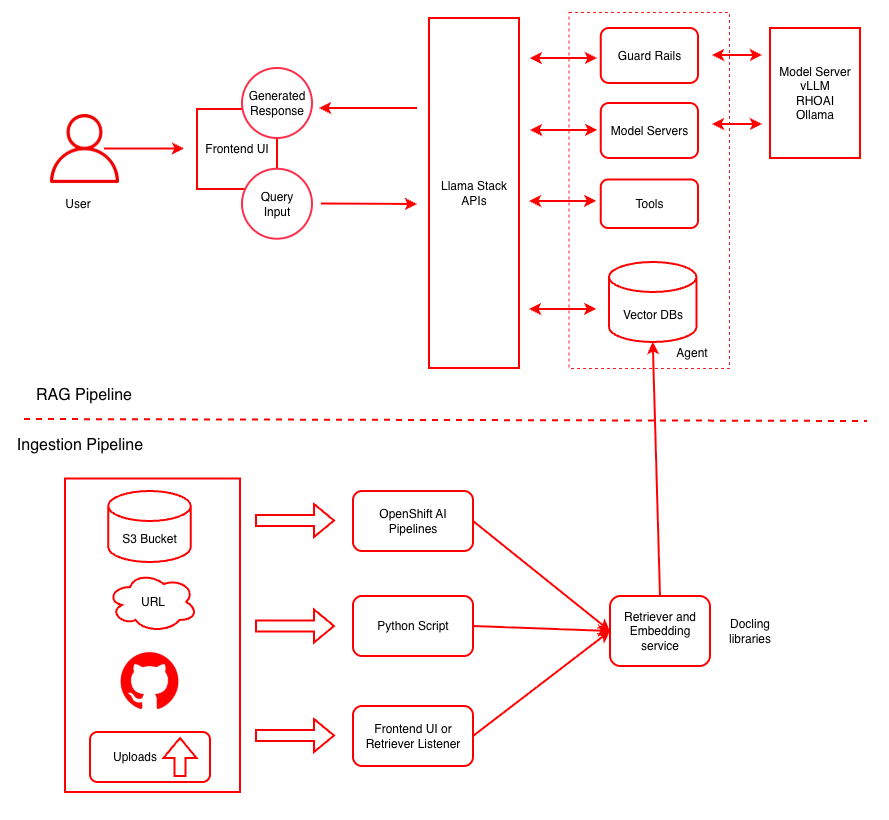
This diagram illustrates both the ingestion pipeline for document processing and the RAG pipeline for query handling. For more details see the RAG reference architecture.
| Layer/Component | Technology | Purpose/Description |
|---|---|---|
Orchestration |
OpenShift AI |
Container orchestration and GPU acceleration |
Framework |
LLaMA Stack |
Standardizes core building blocks and simplifies AI application development |
UI Layer |
Streamlit |
User-friendly chatbot interface for chat-based interaction |
LLM |
Llama-3.2-3B-Instruct |
Generates contextual responses based on retrieved documents |
Safety |
Safety Guardrail |
Blocks harmful requests and responses for secure AI interactions |
Tools |
Web Search, Knowledge Base Retrieval |
Extend agent capabilities with external data sources and retrieval tools |
Embedding |
|
Converts text to vector embeddings |
Vector DB |
PostgreSQL + PGVector |
Stores embeddings and enables semantic search |
Retrieval |
Vector Search |
Retrieves relevant documents based on query similarity |
Data Ingestion |
Kubeflow Pipelines |
Multi-modal data ingestion with preprocessing pipelines for cleaning, chunking, and embedding generation |
Storage |
S3 Bucket |
Document source for enterprise content |
Supported Models
| Function | Model Name | Hardware | AWS |
|---|---|---|---|
Embedding |
|
CPU/GPU/HPU |
|
Generation |
|
L4, HPU, Xeon |
g6.2xlarge, N/A, m8i.8xlarge |
Generation |
|
L4, HPU, Xeon |
g6.2xlarge, N/A, m8i.8xlarge |
Generation |
|
A100 x2/HPU |
p4d.24xlarge |
Safety |
|
L4/HPU |
g6.2xlarge |
The 70B model is NOT required for initial testing of this example. The safety/shield model Llama-Guard-3-8B is also optional.
|